


Specialization – Solo Project
Vampire Survivors Clone
Focusing on data-oriented enemy handling, stats– and item systems I created a cut-down version of the hit indie game Vampire Survivors.
C++
Data-oriented Programming
Godot Engine
GDScript
Why?
During our second year at The Game Assembly we planned and executed a personal project to support our portfolios, related to something we find fun and interesting.
While 3C-, Engine-, and tools programming are all great fun, what I enjoy programming the most are Gameplay Systems. Things like stats, items, enemies are all really enjoyable to work on. Vampire Survivors is a game with very simple 3C but deep gameplay systems, that’s why I found it a perfect fit as reference game for my specialization.
What?
On the surface, Vampire Survivors is a simple game. The player can only walk around in 8 directions and automatically attacks the brutal onslaughts of enemies that come for them. Along the way you pick up upgrades that change your stats and moves in order to allow you to survive the increasing difficulty. My goals were to make a cut-down version of it with a heavy focus on performant data-oriented enemy-handling, along with stats- and item systems.
The reason I wanted to do my enemy-handling in a data-oriented way is because Vampire Survivors only supports having about 300 enemies on screen at a time, likely for performance reasons. “That’s ridiculous” I thought, “I’m gonna make it work with thousands!”, thus I chose to work in C++ to allow myself to write as optimized code as possible. Since neither Unreal nor our own custom engine Bean has good 2D-support I chose to work in the Godot Engine which handles 2D great.
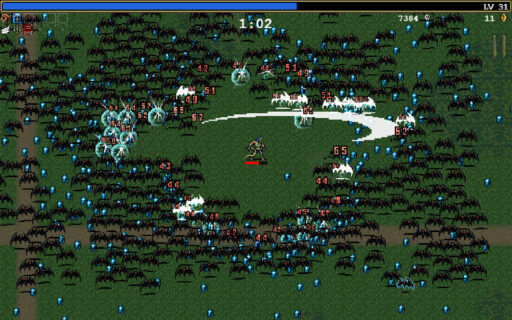
Results & Reflection
This project was a learning experience. Although I had worked with Godot before the specialization, I had never used C++ with it, only C# and their own scripting language. Setting up their C++ build system, configuring Godot to use my binaries as well as actually “binding” functionality to the Godot editor proved to take a bit more time than I had originally thought.
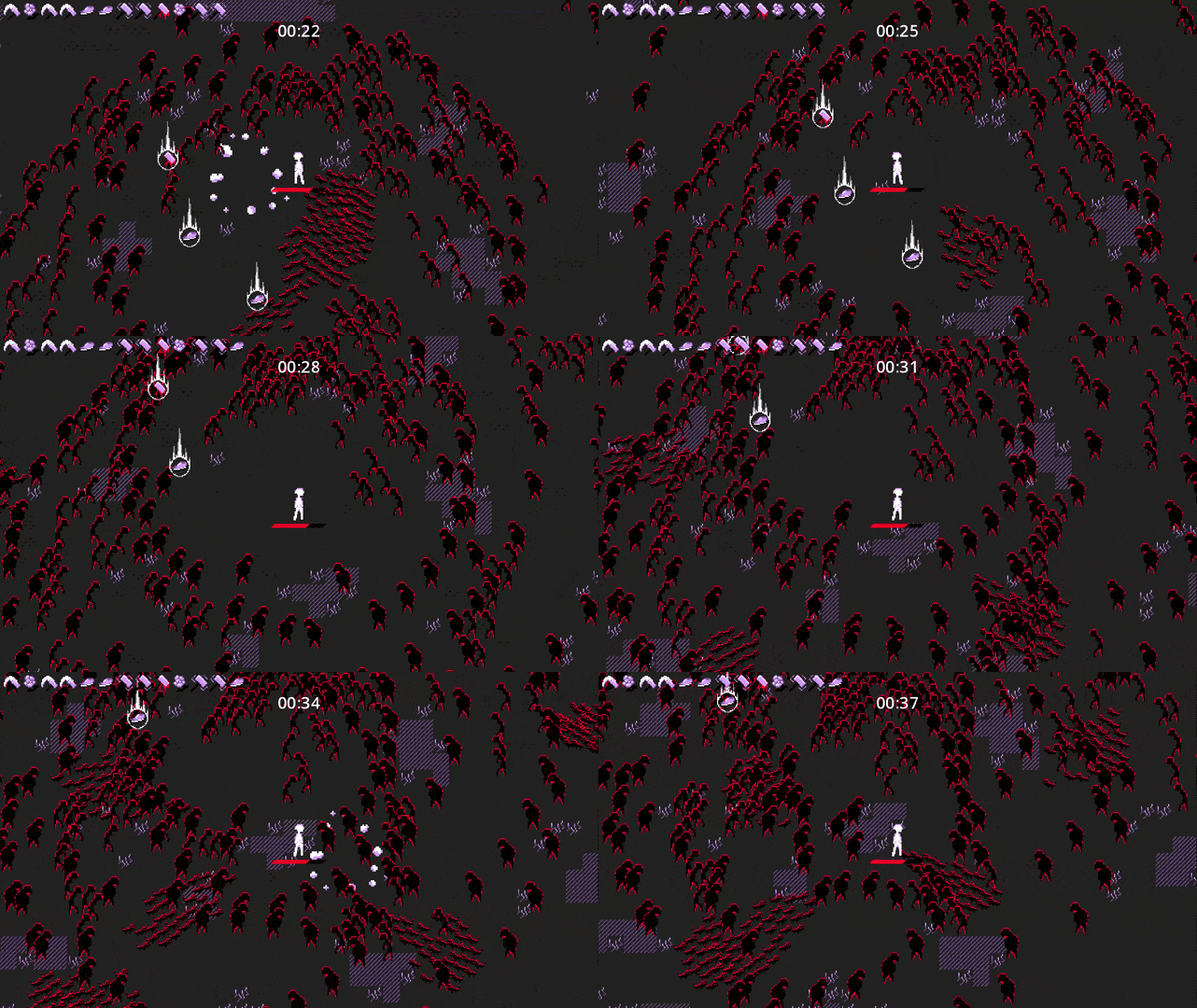
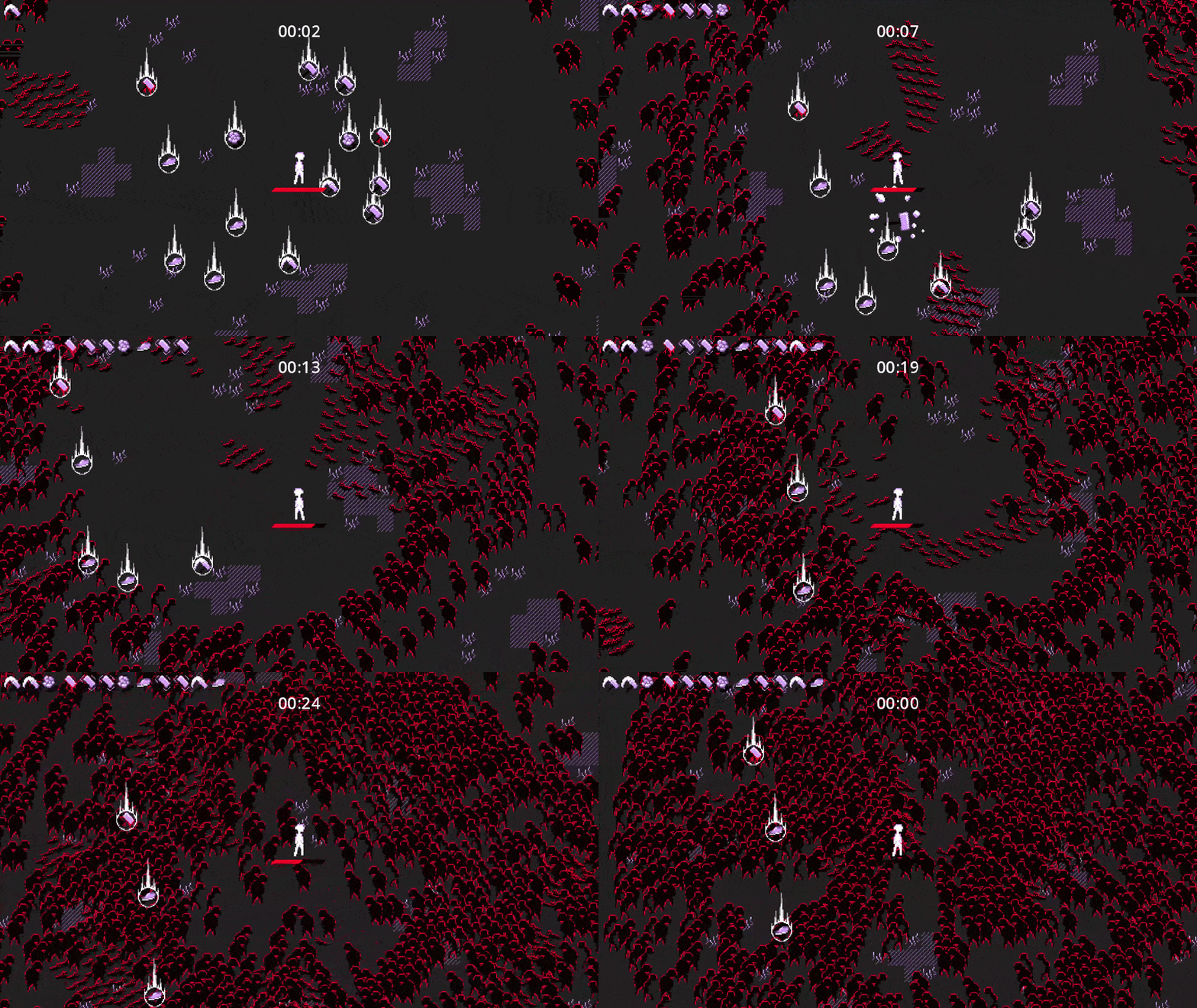
In my hunt for performance I also discovered new ways to handle collisions and rendering in Godot which was way faster but set me back a bit in relation to my original planning, causing the end result to be a bit less polished than I had liked. In the end my enemy-handler could handle almost 2000 enemies at a time before performance was impacted!
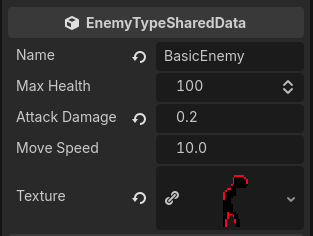
In some ways I did over-achieve my goals however. I hadn’t originally planned on making my enemy-handler not just data-oriented but also data-driven. In the end product, all it takes to create a new enemy type is to create a new file in the Godot editor, set up your textures and parameters, then boom- it can be spawned in the game.
For player stats I did achieve all my original goals, to support a set amount of stats where items can add, pre-multiply or post-multply that stat’s result which gives designers more flexibility to balance items. Technically stats aren’t forced to be tied to items at all, in its current state you could make a muddy area that temporarily decreases the player’s movement speed stat very easily- however I did not have time to implement it.
I tried to pinpoint why I got less done in time than I had originally planned, of course using C++ in Godot and me discovering new more efficient ways of handling enemies set me back some time but I think I also over-prioritized making this website. Originally I had planned to write way less about each individual game project but once I realized how much I had to say and show about some of them I decided to make full pages for them. In the end I think it was the right choice, next time I’ll identify such setbacks earlier and re-prioritize earlier to keep expectations in check and have an easier time cutting down less important things!
Future Improvements
- In order to increase the number of enemies even more, I would need to move away from Godot’s built in collision system for handling enemy overlap and instead create my own. A simple grid or quad-tree implementation would be plenty, and since all enemies only need circle colliders I can optimize it further than Godot’s much more general collision system allows for.
- I’d like to create more things that interact with the stats system to really stress it, think environmental effects like muddy areas you walk slower through or perhaps allowing enemies to give you temporary negative status effects like decreasing your attack range.
- Right now all items just modify the stats of the player. It’d be fun to expand on it to make items more flexible and allow them to do more things like add on entirely new types of attacks or other meaningful gameplay changes.
- Custom Enemy behaviours. Currently enemies basically just walk towards the player like most enemies in the reference game. However it would be useful to allow other programmers to add enemy-specific behaviors by specifying an override.
- Recreating more adjacent systems like the random item drops and leveling would make the experience more complete and is something I’d find fun to add.
How did I make it?
Data-oriented Enemy Handling
The enemy manager was the first thing I tried coding with C++ in Godot, since Godot’s C++ interface was new to me, I reworked it quite a lot but also learned a ton!
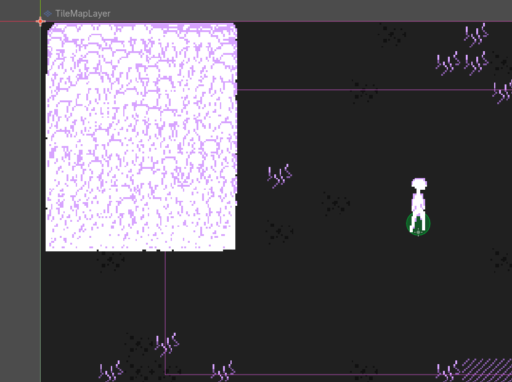
My first experiment was just drawing 10 000 sprites and making them move towards the world origin. The way I did this was not the usual way though. Normally you would create 10 000 actors and put a script on each of them that controls their behaviour. That’s the object-oriented approach, however having 10 000 nodes with scripts is slow, instead I chose the data-oriented way. Having one central manager managing one large pool of enemy structs is significantly faster. I was even able to skip having actors in the scene at all by directly communicating with the engine’s renderer and physics system. When doing so you call functions to update your sprite/collider with an ID saved in the enemy only when something has actually been updated. That’s why rendering thousands of enemies at a time was no problem at all!
I did have a lot of interesting problems caused by this optimization though. Like enemies staying visible in editor after playing because I had missed to clean them up. Whoops! I also used Godot’s physics system to separate enemies at first. That was expensive so I turned them all into triggers and handled separation myself instead which was cheaper. That along with decreasing the physics update rate allowed me to increase my max enemy count from 1000 to almost 2000.
To make it cheap to quickly kill and spawn enemies I created an object pool to be able to quickly re-use the same memory. My mistake was trying to make it too general at first, in the end I redid it specialized just for enemies. That way I could have the pool generate the enemy IDs and save a hash map to also have fast and easy look up.
While I hadn’t originally planned for it I also wrote a simple enemy wave manager that spawns waves of set patterns of enemies at a set rate. This could easily be written in Godot’s GDScript language (a much simpler python-like language) and just interface with the enemy manager. I made it because I wanted to be able to show off the enemy manager and the absurd enemy counts in a way that at least somewhat look like the reference game. Before this I had them all spawn in a square which didn’t exactly look natural.
Stats System
The stats system was designed to be pretty similar to Vampire Survivor’s. The player has a set amount of stats, initialized to reasonable base values, that can then be changes through Modifiers.
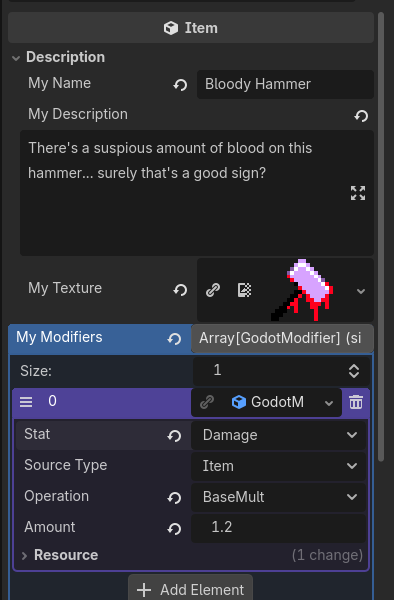
A modifier consists of 4 values. The source type (example: Item). The Stat type (example: Attack Damage). The operation (which can either be addition, multiplication with base values before addition, or multiplication after addition). And lastly the amount that is added or multiplied with the base stat. Multiplication after addition is obviously the most fun and chaotic one though since it scales better and you can create really broken builds with it >:)
To use the modifiers I created a Stats Handler. The player owns one and sets up its base values through it. The base stats and modified stats are stored separately. Whenever a modifier is added or removed we set a flag to “dirty”. That way we know to re-calculate the modified stats the next time the player tries to get them. Since they’re cached and only-recalculated when necessary it is performant for the player to call the getters all the time, therefore the player doesn’t need to save or cache the values on its own, reducing the risk of developer mistakes while still being performant! I think that’s pretty nice.
Items
After implementing my stats system I needed a good way to test it out. I started out making my Item class in C++ as well but ended up remaking it in Godot’s GDScript to save development time since it wasn’t as performance-critical as enemy management.
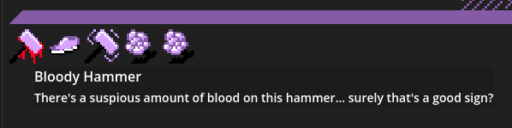
An Item is just an a resource with a name, description, texture and an array of Stat Modifiers. I then made a simple ItemPickup actor that can be placed in the scene, it just holds an Item. After that made it so the player can pick them up by implementing an ItemsHandler for the player. It contains all the player’s items and handles adding and removing them and sending events when that happens. This allows the player UI to listen to these changes and display the player’s items live in the top-left of the screen in a flexible way without coupling the systems at all!
An added bonus is that due to the way I’ve chose to serialize my Items, they’re actually just human-readable text files and can be easily version-controlled!
Like what you’ve seen? Check my contacts below! ⬇️
Or check out my About Me page? Maybe a project? Say hmm… Project 6?
Or like don’t. Your choice