
TGA Project 6
Finders Keepers
Play as a master thief contracted to infilitrate the king’s keep. Snatch powerful arcane crystals, enabling you to perform acrobatic traversal, evade the watchers, and steal the priceless heirloom.
My Contribution
Input- & Action System
Particle Editor Tool
Graphics Programming
Debug Tool
Gameplay Systems
What is Finders Keepers?
Finders Keepers is a Pseudoregalia-inspired 3D precision-platformer made in 14 weeks by Water Leaks Studio – a team of 20 students from The Game Assembly Malmö. This game was developed in our own in-house custom C++ game engine bean and levels were designed in- and exported from the Unreal editor.
What I did
Data-driven Input- and Action System
Since we were making a a 3D-platformer we decided we needed gamepad support. I wanted to provide a unified interface so our gameplay programmers wouldn’t need to think about what input device is currently being used. That’s why I re-did our entire input system and implemented data-driven actions.
All actions are mapped inside easily version-controlled, human-readable json files. These control what inputs map to which actions, wether they are buttons or axes. There’s also “Planars” and “Spatials” which are just 2D and 3D vectors.
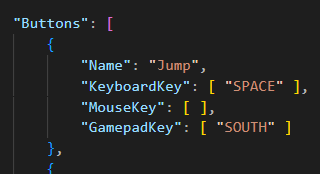
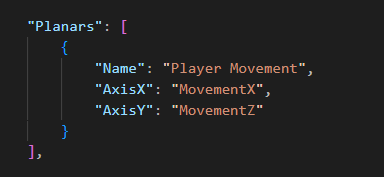
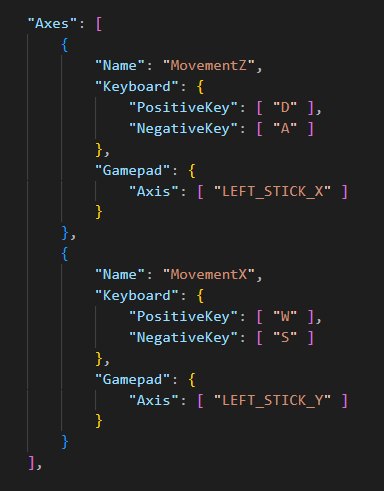
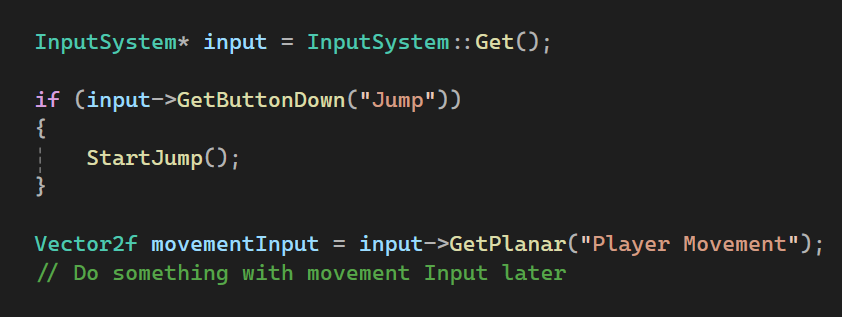
In the examples here you can see the button “Jump” being bound to space on keyboard and the south face button (“A” for Xbox) on gamepads. You can also see the Planar “Player Movement” made up from the axes “MovementZ” and “MovementX”. That means the input from either WASD on keyboard or the left joystick on gamepad can be super easily gotten in one line.
What’s so nice about this is that we can change inputs around and even add support for brand new types of controllers without ever having to touch gameplay code!
I decided on using the hugely popular SDL library for getting input. This gives us a big advantage because SDL supports a ton of devices and gamepads, including Xbox, Playstation, Switch gamepads (and more) natively! This did require some refactoring of other things in our engine but was worth it as it allowed us to make it less reliant on Windows, reducing vendor lock-in.
One thing you may notice is that I’m using strings for mapping actions. You might think that’s slow but actually, they aren’t strings at all! The string literals are hashed to uint32 in compile time with a constexpr CRC32 function, avoiding using strings at all! Now you might think that makes it way less debuggable and you’d be right, except actually the system is designed so they’re kept as real strings in debug builds and only hashed in release builds, giving you the best of both worlds!
Oh also, while it’s not used in Finders Keepers I also implemented gyro support. Check it out in the video to the right or below this text :D
Particle Editor Tool
In our last project our technical artists had to create particle emitters in raw json-files, then preview them in my particle viewer tool. This was tedious, difficult and wasted a lot of time. This time around I built a fully-fledged particle editor so they didn’t even have to touch any json-files!
The editor is pretty flexible, allowing the user to choose between using curves, constant float numbers, random float numbers and random integer numbers- for most properties.
It also supports expected features like loading and saving particle emitters along with displaying multiple at once for more advanced effects.
Lights
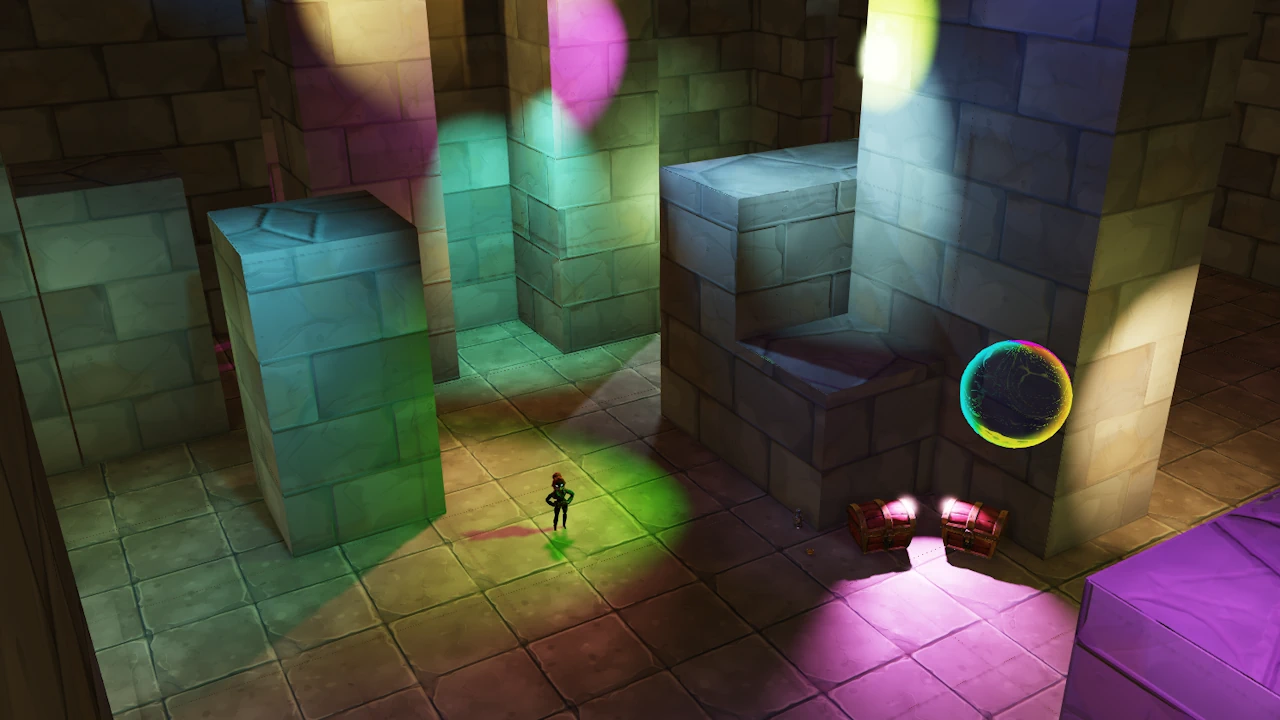
In our last project we had a limit on the amount of lights in a scene due to a poor structure for uploading lights to the GPU. They used to all be uploaded at once in a giant buffer. Now they’re uploaded and used 8 at a time allowing us to (in theory) have unlimited lights.
In reality performance was pretty poor so to improve it I made shadow casting per light toggleable from the editor. That way our level designers and artists have more control and can help optimize levels.
Threading
The biggest performance drain in our engine however was not the rendering itself but rather the CPU time spent filling our deferred context with commands for the command list. In order to improve this I decided to create multiple contexts and thread filling them. I made 3 threads, one for filling commands to render the GBuffer, one to render shadow maps and draw lighting, and another one for forward rendering, debug drawing, 2D and text drawing. This significantly boosted performance but could still be improved in the future if I split the shadow/light thread into even more threads since this is the slowest one.
While we have been taught threading at The Game Assembly I did learn a lot of new things. Previously I had only used mutexes and locks/guards but to solve this problem threading problem I instead used semaphores. This was my first time working with them but I was very impressed with the simplicity of using them and how much cleaner a semaphore solution was for this compared to a mutex solution.
Shader Compilation Stutter
Last project, if a shader was loaded it would be compiled in runtime and then saved as long as something in the world used that shader. If nothing was left that used it however it would be unloaded and would need to be re-compiled in runtime again the next time it was used. This led to some significant stuttering at times. This project I re-wrote shader-handling to only compile shaders once, then cache them locally and use the cached versions the next time its loaded. This practically removes all stuttering after the first time a shader has been compiled.
Material Instancing
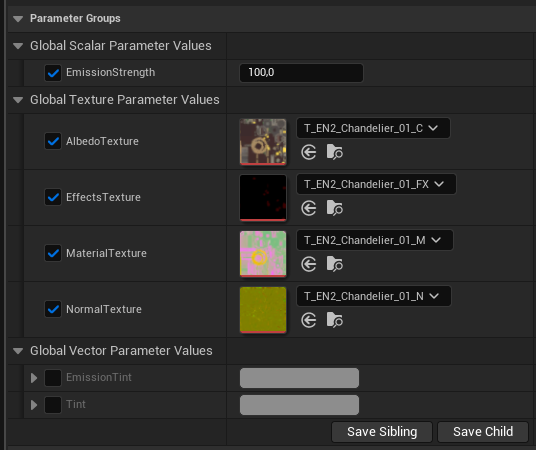
One improvement I implemented for our graphical artists’ pipeline was supporting importing Material Instances from the Unreal Editor into Bean, our engine.
The difference is that our artists used to have to create individual json-files describing the material and textures for every object. Now they create Material Instances from set base materials, overriding only what they need to- directly in the Unreal Editor. Those are exported with the levels, then read by Bean when loading them.
This means artists almost don’t have to touch material json-files at all and also has the benefit of making sure textures look correct in-editor.
Other
I also worked on other stuff such as making a new debug menu interface. With this any programmer can easily add menues and information from anywhere in the code. The system is shown off in the video, along with the new checkpoint system I made. Allowing our level designers to place trigger areas to activate checkpoints and to place specific points where the player actually respawns. I exposed it to the new debug menu system in order to allow our level designers to quickly teleport between checkpoints and verify them.
You only briefly saw it at the absolute beginning of the video but I also made the “see player through wall” shader.
Reflection
This was a great project. I got to make a whole new input system to replace the old one which was really fun. I also got to improve the engine’s graphics capabilities and performance, along with multiple pipelines. Bean is still not perfect, there’s a few inefficencies and annoying issues from the last project still in the code but at least it got better.
I do wish I’d had gotten to do more gameplay programming this project but our reference game is kind of light in terms of gameplay features, especially after we scoped it down so there wasn’t much left for me to take except doing the checkpoint system. Oh well I’ll try to snag more gameplay next project 😀
Play it!